
The WPS Salary Information File (SIF) is the fixed-format payroll file UAE employers submit through their bank or WPS agent to the Ministry of Human Resources and Emiratisation (MOHRE) for every monthly salary disbursement. When MOHRE's validation engine rejects the file, salary payments stall and employers risk labour-law penalties for late disbursement under Federal Decree-Law 33/2021.
This guide covers the 10 most common SIF file errors UAE payroll teams run into, how to decode "excluded" status, how to debug employer-ID and establishment-ID mismatches, and the operational fixes that keep MOHRE validation green month after month. Written for UAE payroll managers, HR operations leads, and finance teams who need the technical reference, not the compliance overview.
What a WPS SIF file actually contains, and why format matters
The SIF is a fixed-width text file, not a spreadsheet. Every field has a defined position, length, and format. The payroll master export your HRMS generates has to match that specification exactly, down to the trailing spaces on short employee names and the leading zeros on employee IDs.
The file carries employer information at the header, employee-level records in the body, and a trailer with totals that must reconcile to the detail lines. If any line is off by a single character position, the whole file fails at the first validation layer. That is why Excel-based WPS workflows are a false economy for UAE employers above 50 staff: it is not that Excel cannot produce the file, it is that Excel will almost always produce one with a stray space, a lost leading zero, or a date in the wrong format.
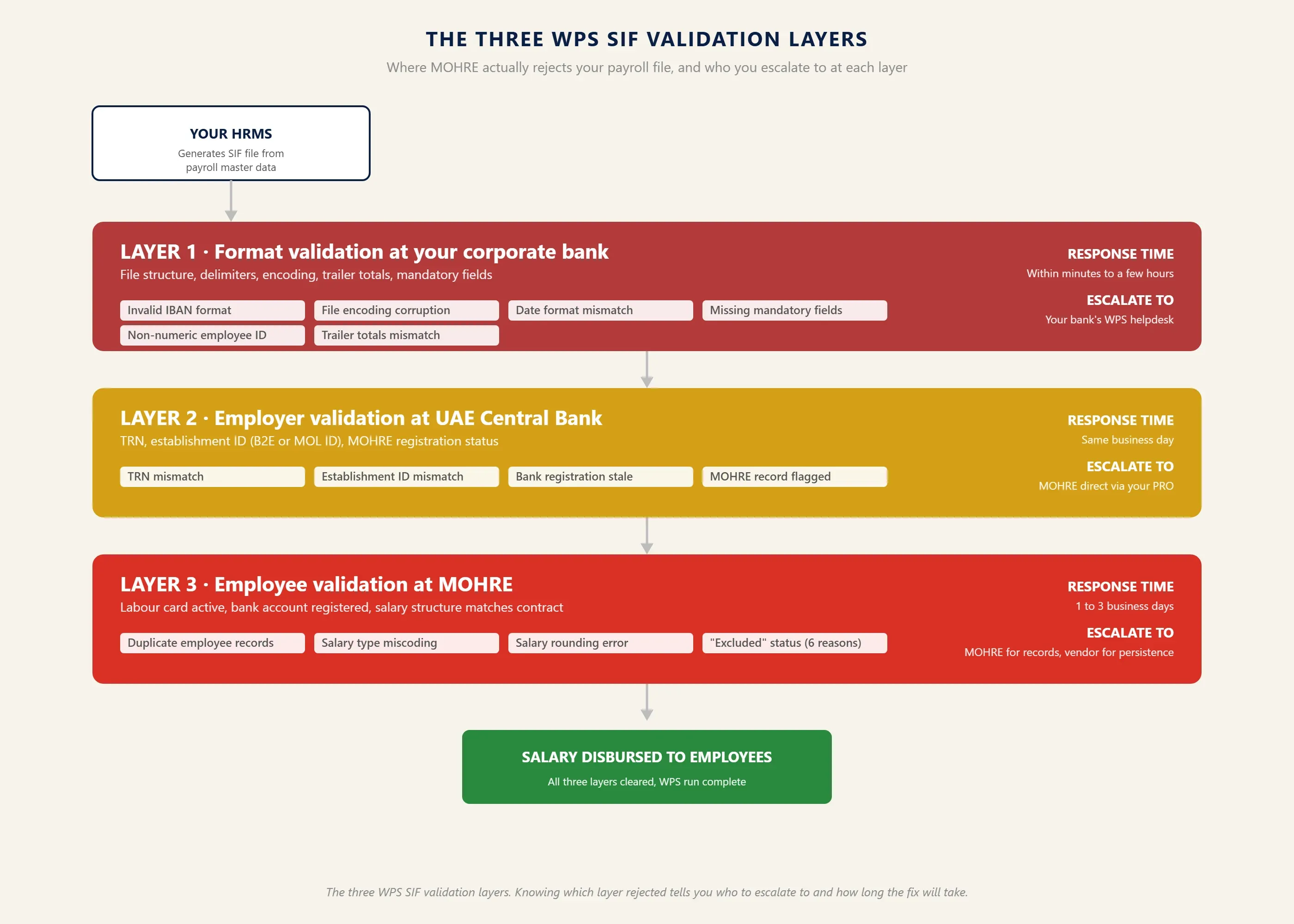
The file does not go directly to MOHRE. It routes through your WPS agent (your corporate bank, usually), through the UAE Central Bank validation layer, and then into the MOHRE compliance check. Each layer can reject for different reasons, and the error you see depends on which layer caught the problem.
How MOHRE validates your SIF file: the three validation layers
In my experience debugging rejections across hundreds of UAE employers, the single most useful thing to understand is which layer is complaining. The error codes are routed back to your bank, but the layer determines who you escalate to and how long the fix will take.
Layer 1: Format validation at the bank. Checks the file structure itself. Record length, delimiter, encoding, trailer totals, mandatory fields present. These errors come back within minutes of submission and are almost always a payroll-software or export-template problem.
Layer 2: Employer validation at the UAE Central Bank. Checks that your employer identifier (B2E or MOL ID), your TRN, and your establishment registration are all live, consistent, and current. These errors typically come back the same business day and almost always point to a MOHRE establishment record issue, not a payroll file issue.
Layer 3: Employee validation at MOHRE. Checks each employee record against the live MOHRE labour-card database. Does the employee exist, is the labour card active, is the bank account registered against this employee, does the salary structure match the contract? These errors take 1 to 3 business days and often need per-employee intervention.
The 10 most common SIF file errors
I have seen most UAE employers hit the same 10 errors over and over. Below is the operational reference I give new payroll managers on day one.
| Error | Why MOHRE rejects | How to fix |
|---|---|---|
| 1. TRN mismatch | TRN in your SIF file does not match the TRN MOHRE has on record for your establishment | Verify TRN in MOHRE establishment portal first; update if wrong; then resubmit |
| 2. Employer or establishment ID mismatch | The B2E or MOL ID in your file does not match MOHRE record | Pull current establishment ID from MOHRE portal; align payroll master; resubmit |
| 3. Invalid IBAN format | Employee bank IBAN is wrong length, wrong country code, or wrong check digit | Validate IBAN against UAE Central Bank format; correct in employee master; resubmit record |
| 4. Salary rounding error | Fils (0.XX) in salary where MOHRE expects whole AED, or vice versa | Check your payroll config: UAE WPS runs on whole AED for basic salary; keep fils only in allowance detail if allowed by your agent |
| 5. Duplicate employee records | Same employee ID or same labour card appears twice in the same file | Pre-flight check in payroll software; look for duplicate payroll runs mid-month; delete duplicate and resubmit |
| 6. Date format mismatch | SIF expects DDMMYYYY; your file has YYYYMMDD or includes separators | Fix export template format in payroll software; this is almost always a configuration issue not a data issue |
| 7. Salary type miscoding | Basic + allowance + total do not reconcile in the SIF format | Audit payroll heads mapping; MOHRE wants basic salary, housing, transport, other as named categories |
| 8. Non-numeric employee ID | Employee ID field contains letters, spaces, or special characters | Reserve employee ID field for digits only; store internal reference codes in a separate master field |
| 9. File encoding corruption | ANSI vs UTF-8 vs UTF-16 BOM encoding issue, Arabic names come through as garbled characters | Set export encoding to UTF-8 without BOM, or ANSI 1252 if your bank requires it; test with Arabic name sample first |
| 10. Missing mandatory fields | Required field is blank or omitted entirely (nationality, labour card expiry, visa number) | Enforce field-level validation at employee onboarding, not at month-end |
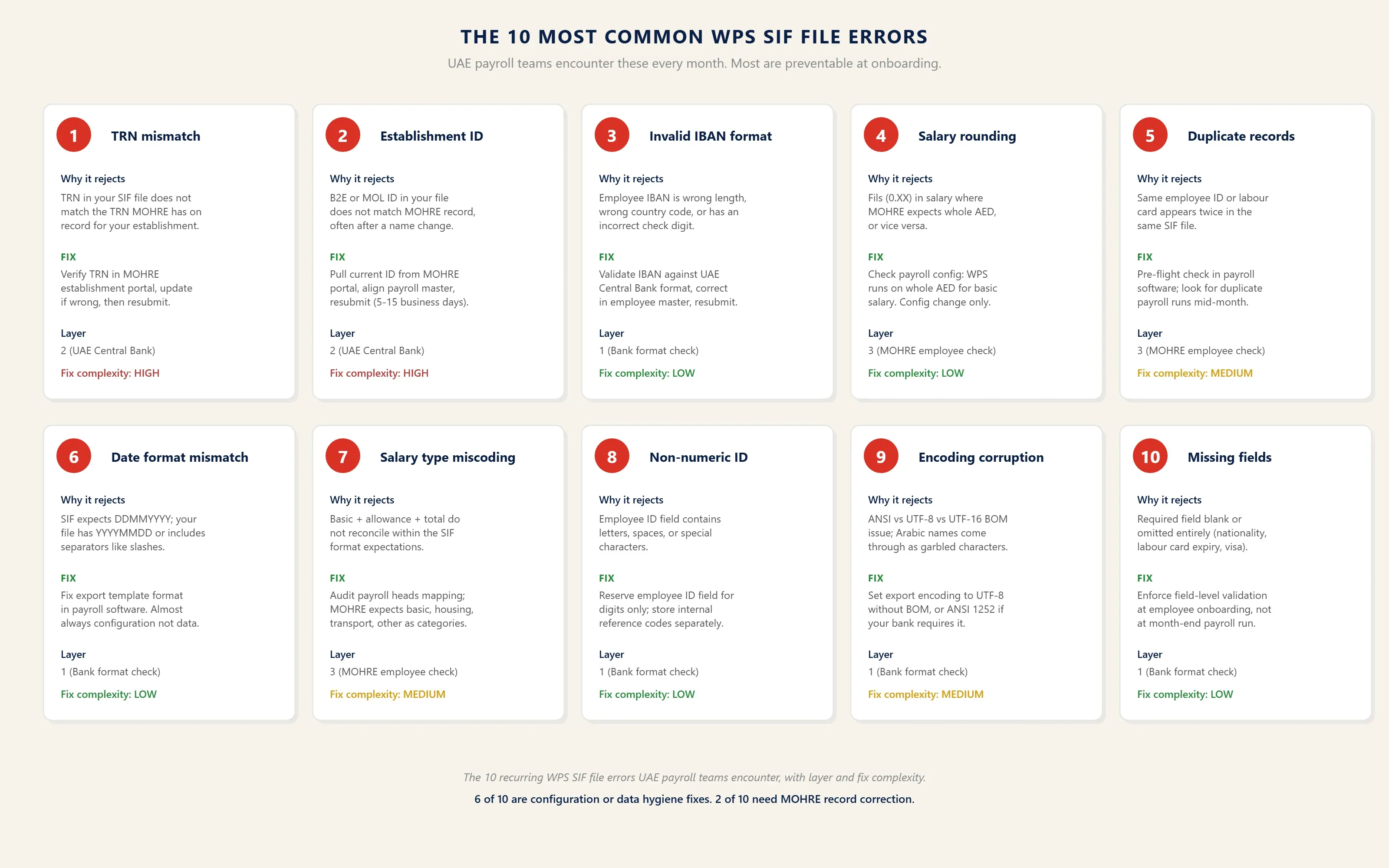
Most of these are preventable at onboarding. Most of them get caught monthly because UAE payroll teams inherit employee records built up over years, often across multiple HR tools, and the master data is dirty.
Decoding excluded status: the 4 legitimate reasons and 2 red flags
Excluded does not mean failed. It means the employee was in the file but not disbursed through this run. There are legitimate reasons for this and there are red flags. Payroll managers who treat every excluded status as an error create unnecessary work and sometimes trigger compliance reviews they did not need.
Legitimate reason 1: Unpaid leave for the full period
An employee on approved unpaid leave for the entire WPS reporting period will show as excluded. No disbursement is due. The record is maintained for continuity but no salary flows. Document the leave approval in your HR system, keep the labour card active, and move on. If the leave spans multiple periods, each one shows the same excluded status until they return.
Legitimate reason 2: Terminated mid-period with final settlement handled separately
An employee who exits mid-month typically gets their final settlement (end-of-service gratuity, prorated salary, leave encashment) through a separate off-cycle disbursement, often by cheque or direct transfer. The regular WPS SIF file shows them as excluded for the period they were not an active employee. The separate settlement is recorded in your finance system but does not flow through the standard WPS file.
Legitimate reason 3: GCC national paid outside WPS
GCC nationals (Saudi, Kuwaiti, Bahraini, Qatari, Omani employees working in the UAE) can be paid outside the WPS framework under specific labour-law provisions. Their records will show as excluded in the WPS file. This is legal, documented, and not an error. Confirm the GCC national status in the employee master and keep the payment evidence for your own records.
Legitimate reason 4: Employee with a disputed labour claim pending
An employee with an active labour dispute pending at MOHRE may show as excluded while the case is open. MOHRE will indicate the dispute status in the response code. Do not try to force the disbursement through until the case is resolved. Pushing a disbursement into a pending dispute can complicate the resolution and extend the timeline.
Red flag 1: Labour card expired without renewal
An expired labour card produces an excluded status that looks the same as the legitimate ones above, but it is a compliance exposure. The employee is working on an expired document, your renewal process has gaps, and MOHRE is flagging it. Fix the labour card renewal immediately, document the gap, and brief your HR lead on what broke in the renewal cycle.
Red flag 2: MOHRE record flagged for compliance review
An establishment or employee record flagged for compliance review (penalty pending, documentation incomplete, past-due obligation) will produce excluded status until the review clears. This is the one error you cannot resolve by fixing the file. Engage your MOHRE PRO, understand what triggered the review, resolve the underlying issue, then confirm the record is cleared before next month's run.
The TRN and establishment ID alignment problem (the hardest fix)
If I had to pick the single hardest SIF error to resolve, it is TRN and establishment ID (B2E or MOL ID) misalignment between what your payroll file says and what MOHRE's register holds. Most new UAE payroll managers assume the TRN in their accounting system and the TRN on their MOHRE establishment record are the same thing. Usually they are. Occasionally they are not, and when they are not, the fix takes 5 to 15 business days.
The mismatch usually comes from one of three sources: your establishment went through a name change or ownership restructuring and the TRN or establishment ID did not sync between FTA (Federal Tax Authority) and MOHRE records at the time; your corporate bank registered your establishment with an older identifier when WPS was first set up; or your payroll software stored the identifier at the HRMS master level years ago and nobody updated it when the business grew.
The 3-step correction path:
- Confirm the current MOHRE record. Pull the live establishment detail from MOHRE's employer portal. Note the current B2E or MOL ID, TRN, and the exact spelling of the registered entity name.
- Align the payroll master. Update your HRMS or payroll software to carry the exact identifiers MOHRE has. This is a one-time fix if you do it right. If your software stores the TRN in a single field (good), the fix is minutes. If it stores it in three places (export template, employee master, employer master), the fix takes longer and needs testing.
- Re-register with the bank. If the identifier change is material, your bank may need to re-register your WPS submission profile. This is the step that takes 5 to 15 business days. Plan ahead and run a parallel disbursement classification for the pending month.
Interim workaround for an active rejection cycle: pay the employees through your bank's regular salary transfer product (not WPS) while the registration catches up, and document the exception reason. This keeps staff paid on time while the back-end issue resolves.
Deadlines, penalties, and the compounding cost of late submission
The UAE's WPS deadline framework is more forgiving than its reputation suggests, but the compounding cost of a long rejection cycle is significant. The pattern we see is that one month's unresolved rejection becomes a two-month cycle, which becomes a three-month cycle, and by then the labour-law exposure is material.
| Days late | Operational impact | Compliance exposure |
|---|---|---|
| Day 1 to 10 | Internal payroll stress, employee complaints | None if resolved within window |
| Day 11 to 15 | MOHRE warning notification | Record flagged, no action yet |
| Day 16 to 30 | MOHRE penalty assessment, system block risk | Labour-law breach documented |
| Day 31 to 60 | Possible labour dispute escalation, trade licence impact | Suspended MOHRE services possible |
| Day 60 plus | Blocked labour card issuance for new hires | Operational crisis, dispute cases open |
Where this timeline matters is in the escalation decision. If you catch an error on day 2 and resolve it on day 5, nobody notices and nothing documents. If you let it drift to day 20, you now have a flagged record that will take months to clear from your establishment history. The best operational practice is also the cheapest: fix fast.
How to catch SIF errors before submission
Prevention is where you win. The payroll teams that run clean WPS month after month share four habits:
Pre-flight validation inside your HRMS before file generation. Your payroll software should produce an exception report before export: duplicate employee IDs, non-numeric characters, missing mandatory fields, salary structures that do not reconcile. If your software does not do this, treat that as a vendor gap and raise it.
Monthly reconciliation of MOHRE employee list against your payroll master. The MOHRE establishment portal shows your current active employee list. Match it to your payroll master. Any mismatch (an employee active at MOHRE but not in your payroll, or vice versa) is a problem you want to catch before the SIF run, not during it.
Quarterly TRN and establishment ID reconciliation. Every quarter, pull the live MOHRE and FTA records and confirm they match what your HRMS stores. Takes 20 minutes, prevents the hardest rejection cycle.
Audit log of changes between SIF runs. Keep a short monthly note: what changed from last month's successful file to this month's. New hires, exits, bank account changes, structure changes. When a rejection comes, you have a short list of likely causes to check first.
When to escalate: your bank, MOHRE, or your software vendor
The escalation path depends on which validation layer rejected. Choosing the wrong one wastes days.
Your bank first for format and layer-1 errors. File structure, encoding, trailer totals. Your corporate bank's WPS helpdesk handles these and usually responds within 1 business day.
MOHRE direct for employer-record issues. TRN, establishment ID, B2E registration. Engage through the MOHRE employer portal or your PRO. These are not bank issues and your bank cannot help you resolve them.
Your software vendor for persistent errors across multiple months. If the same error pattern keeps appearing month over month, the root cause is almost always in your payroll configuration, not in your data. Vendor engagement with evidence (last 3 months of error logs) resolves it faster than per-month firefighting.
For MOHRE direct escalation, the WPS section at MOHRE handles disputes, record corrections, and establishment-level issues. Contact routes are documented on the MOHRE portal; your bank's WPS helpdesk can also route escalations if the issue sits at the MOHRE record level rather than file level.
Why we built Horizon HRMS with WPS validation inside the payroll module
Most WPS tools run validation at submission. By the time the file hits the bank, the error is already baked in and the fix is a resubmission cycle. We built Horizon HRMS to validate inside the HRMS, before file generation, because that is where the operational time is actually spent. Pre-flight checks for all 10 common errors, MOHRE employee list reconciliation at month-end, TRN and establishment ID stored at the employer master and cross-checked at every SIF generation, Arabic-safe encoding by default, and audit logs that answer "what changed since last month" without digging. We built this because our clients kept hitting the same 10 errors and we got tired of debugging per month alongside them.
Next steps for UAE payroll managers facing WPS SIF rejection
If you are reading this during an active rejection cycle, here is the immediate recovery sequence:
- Pull the full error code from your bank's WPS portal. Not the summary your bank emailed you, the detail from the portal. Do this within 2 business days before the record ages out of the retry window.
- Identify the validation layer. Format (layer 1), employer record (layer 2), or employee record (layer 3). The error code tells you which.
- Match to one of the 10 common error patterns above. Nine times out of ten it will match. The tenth time, raise it to your vendor.
- Fix at the source, not in the file. Fixing a specific line in the SIF without correcting the master data means next month you hit the same error. Fix the item master or the employee master or the establishment record, then regenerate the file.
- Resubmit and confirm. Once the file is accepted at all three layers, verify the disbursement reaches employee accounts within the standard timeline. A clean submission does not always mean a clean disbursement; check the second confirmation.
- Document what changed. Add a short note to your monthly payroll change log. Next month's run will be faster.
- Review the preventive practices in the section above for anything that would have caught this before submission. If any of those four habits are missing, this is the month to add them.
The payroll teams that do this consistently stop treating WPS as a monthly fire drill. The teams that do not keep hitting the same errors until the compliance cost catches up with them.